How to Organize Hundreds of Voice Memos and Find Old Song Ideas
Updated · By Charlie Crystle, founder
When you have dozens or hundreds of old memos called "New Recording", you must listen to every memo to know if there's anything in there worthwhile. That backlog needs a weekly listening habit--or a tool to do the discovery work for you.
Find the songs buried in your Voice Memos.
Download Unstrander free15 recordings titled and transcribed free. No credit card. No subscription.
For Apple silicon Macs with macOS 26 or later.
If you write songs with an iPhone in your pocket, you probably have a pile. A riff hummed in the car. A chorus sung into the phone on a walk. Forty seconds of guitar from a night you can't remember. This guide is about that pile, and how Unstrander can make a difference.
Is it normal to have hundreds of unfinished song ideas in Voice Memos?
Yes. Songwriters ask each other about it all the time, in threads like these on Reddit's songwriting forums:
- How many songs (complete or incomplete) do you have in your Voice Memos and I have like 100 unfinished songs… is that normal.
- 47 voice memos of song ideas on my phone. used maybe 3 of them.
- Where do you keep your songwriting "boneyard"
- How to organize thousands of voice memos/ideas without becoming insane
- After years and years of random voice notes and half-baked song ideas, I finally wrote one all the way through
Capturing ideas isn't the problem. Voice Memos is fast, it's always there, and it works. The problem comes later: finding the right memo, remembering what it was, and deciding whether it's worth finishing. That's an organizing job, and Voice Memos was built to record, not to sort a backlog. The new transcription is really great, but it still doesn't title songs.
Is organizing new recordings different from sorting old ones?
Yes, and it's the most useful distinction in this guide. A new memo is easy: you know what's in it, because you just recorded it. Ten seconds of typing gives it a name you can search for later.
An old memo is a mystery. "New Recording 247" could be a chorus, a guitar part, a grocery list or nothing at all. Before you can name it, file it or delete it, you have to play it. With hundreds of them, the listening is the job.
So there are two problems, and they need different answers:
- New recordings need a habit: rename, file and favorite as you go.
- The old backlog needs a way to find out what's in each memo without listening to all of it, or a plan for listening to all of it.
What can Voice Memos do on its own?
Voice Memos can rename recordings, put them in folders, mark favorites, name them after your location, and transcribe and search speech. Here is each one in brief, and where it stops helping a songwriter. (Steps from Apple's Voice Memos guides for iPhone and Mac, checked October 2026.)
- Renaming. On iPhone, open the recording and tap its name. On a Mac, select the recording, click its name in the list, type, and press Return. A good name says what you'd search for later, like "Gmaj riff, fast strum, verse idea" or "Chorus melody, sung". The limit: it only works on memos you already know.
- Folders. Group recordings into folders such as "Riffs", "Band practice" or one per song. A recording can be in only one folder at a time. The limit: a folder is a decision, and you can't decide about a memo you haven't heard.
- Favorites. Marking a memo as a favorite adds it to the Favorites smart folder. It's good for triage while you listen. The limit: it tells you a memo was good, not why or what's in it.
- Location-based naming. With location access on, new recordings are named after where you were instead of "New Recording". It helps you remember where an idea came from, but it says nothing about what's in it.
- Transcripts and search. Voice Memos transcribes speech and searches both titles and transcripts. On iPhone this needs an iPhone 12 or later and a supported language. On a Mac, Apple's guide for macOS Sequoia says it needs Apple silicon. Older recordings are transcribed when you open them, if they contain speech. The limit: it's built for speech, so sung words over an instrument come through poorly, and a memo that's all guitar has no words to find.
Sources: View a Voice Memos transcription on iPhone, View a Voice Memos transcription on Mac, Organize recordings in Voice Memos on iPhone, Organize recordings in folders on Mac, Edit a recording on Mac (renaming) and Change settings in Voice Memos on Mac (location-based naming).
Why singing is hard to transcribe, and how to get text out of your memos, is covered in Transcribing Voice Memos on a Mac, and why sung lyrics are hard.
How do you organize hundreds of old Voice Memos?
You either listen to every memo and sort it yourself, or let software listen first and give each one a title and a transcript you can scan. Both work. They differ in how many hours you spend.
The manual way: a weekly review
The best manual method is a regular review. Once a week, open Voice Memos on your Mac, where a big screen and a keyboard make it faster. Play a batch of memos, rename each one, heart the good ones and move them into folders. Delete what's clearly dead.
Some things make it go faster:
- Start with the long ones. A 3-second memo is a reminder. A 4-minute memo is usually a full idea.
- Work by date. Take one month or one season at a time, so you know when you're done with it.
- Keep a note per song. Many songwriters keep one Apple Note per song, with the lyrics, the chords, and the name and date of the memo it came from. It works if you're strict about the link, because nothing ties the note to the recording except the line you typed.
The limit is time. A weekly review keeps new ideas from joining the pile, and it slowly shrinks the old one. If you have 500 memos and clear 20 a week, that's 25 weeks, about six months, as long as you never miss a week.
The automated way: let software listen first
The other way is to have software play every memo for you: transcribe the words, describe what it hears, and give each memo a title. You still decide what to keep, but you decide from a list of titles and transcripts instead of a list of "New Recording" files. That's the part that doesn't scale by hand.
A few things to look for in any tool that does this: whether it works on recordings you already have (not only new ones), whether it changes your originals, and whether your audio is sent to an online service.
What it looked like on a real backlog
These are my own observations. I'm Charlie, the person who makes Unstrander, and my own Voice Memos library is where this started. It held more than 900 memos recorded over about 11 years, about 6.7 GB of audio.
What I learned from working through it:
- Renaming by hand wasn't going to happen. Even at a minute per memo, just to hear enough to know what each one was, that's more than 15 hours of listening before renaming anything.
- Transcription on the Mac was fast. The transcription step took well under a minute for a typical 3–9 minute take, on an Apple silicon MacBook Pro. That's the transcription step only, and times vary by Mac.
- Spoken words transcribe very well. The notes I talked into the phone came back clean enough to search and read.
- Sung words over a loud guitar are usable, but need editing. Enough comes through to tell you what the song is and to search for a line, but you will correct the lyrics by hand.
- Separating the vocal from the guitar first didn't help enough. I tested it. It wasn't worth the extra time, so it isn't in the app.
How do I find an old song idea in Voice Memos?
Search for words you remember, then narrow by date, then listen. Most lost ideas turn up with one of these three.
- By remembered lyrics or spoken notes. Type a word you might have sung or said into the Voice Memos search field. It checks titles and transcripts. If you spoke a note into the memo ("this is the bridge for the river song"), searching "river" will find it. A sung line is less certain, because singing transcribes poorly.
- By date. If you remember roughly when, scroll to that stretch and listen through it. Long memos from that month are the likeliest candidates.
- By title. Search the title for the words you'd have used. If location-based naming was on, search for the place you were, like a street or "Home".
If you think a memo is missing rather than just hard to find, check the Recently Deleted folder first, and see Your Voice Memos are not backed up. Getting them safely onto your Mac.
Where does Unstrander fit?
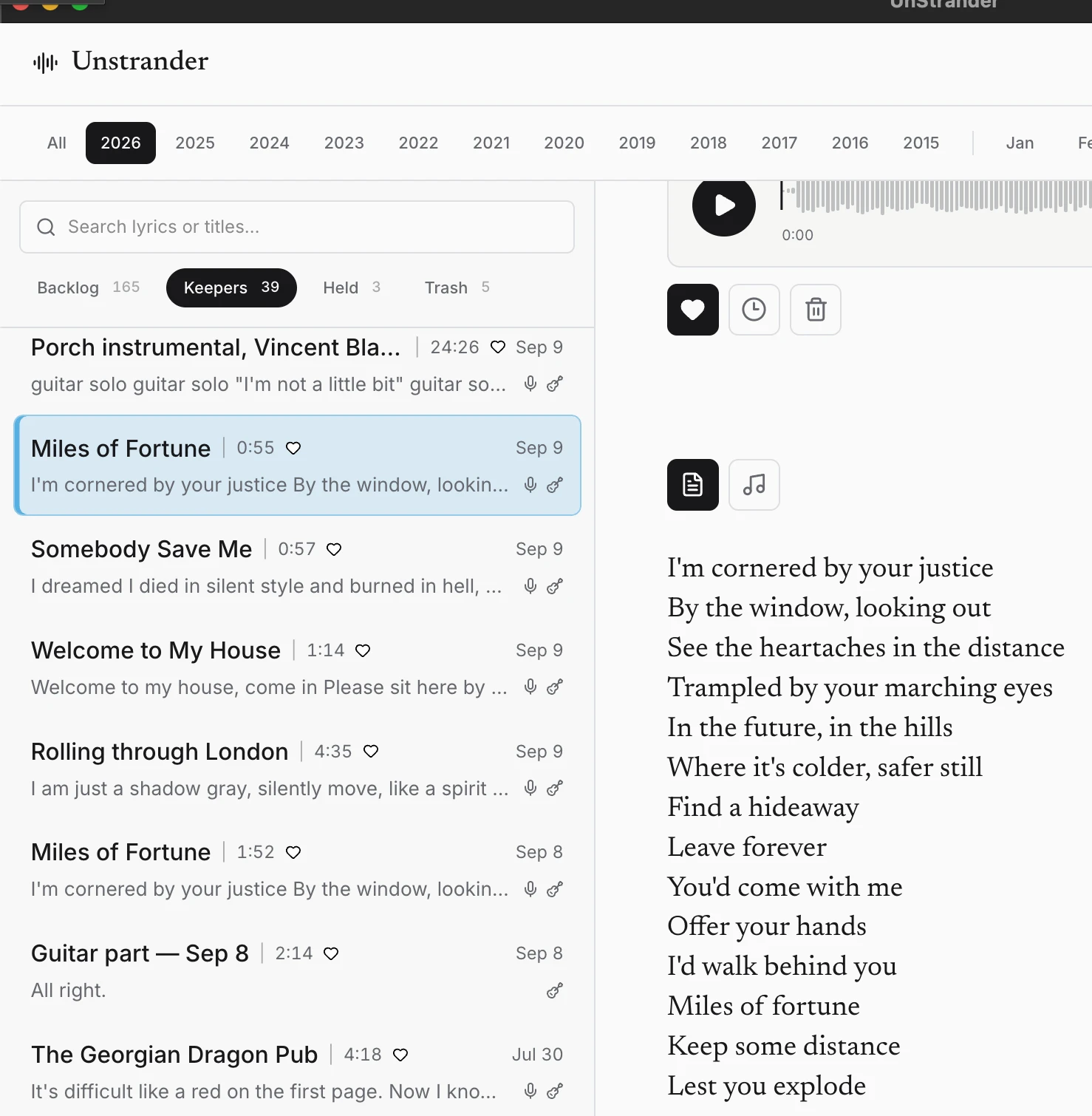
Unstrander is a Mac app for your current backlog you. It reads the Voice Memos synced to your Mac, transcribes them as best it can, gives each memo a descriptive title from what it hears, and lets you search, keep, hold or archive each one. Transcription and titling run on your Mac--not in the cloud.
It reads your Voice Memos library, and never changes the original recordings. Its titles stay in Unstrander's own library; it doesn't rename anything in Voice Memos.
What it adds to the manual methods:
- Titles for the backlog. "New Recording 247" becomes a few words that describe what's in it. These aren't song titles; they're clues, so you know what you're about to play.
- Search by what you sang or said. Titles, transcripts and your own edits are all searchable.
- A decision for every memo. Each recording starts in Backlog. Heart it to make it a Keeper, hold it for later, or archive the dead wood. The archive is recoverable, and deleting a memo for good still happens only in Voice Memos.
- A place to keep working. Edit the lyrics, add chords, record new takes, or send lyrics to Apple Notes.
Keep recording in Voice Memos the way you always have. Unstrander is for the part that comes after. It runs on a Mac with Apple silicon and macOS 26 or later; see what it finds in a library.
Related guides
- Transcribing Voice Memos on a Mac, and why sung lyrics are hard: how to get text out of your memos, and what to expect from sung lyrics.
- Music Memos is gone. What songwriters use instead on a Mac: what replaces each thing Apple's songwriting app did.
- Your Voice Memos are not backed up. Getting them safely onto your Mac: how to make a real backup before you start sorting.
Your next great song might already be recorded.
You've captured the ideas. Unstrander helps you find them: years of Voice Memos turned into a searchable library, with descriptive titles, lyric transcripts, and a simple way to decide what to keep.
Download Unstrander free15 recordings titled and transcribed free. No credit card. No subscription. One-time $4.99 launch price ($29.99 regular) for unlimited processing.
For Apple silicon Macs with macOS 26 or later.