Transcribing Voice Memos on a Mac, and why sung lyrics are hard
Updated · By Charlie Crystle, founder
If you write songs into Voice Memos, you have probably tried the built-in transcript and found that it handles your spoken notes well and your sung ideas badly. That isn't you, and it isn't your phone. Sung lyrics over an instrument are one of the hardest things a speech model can be asked to read.
Recover your backlog of great songs.
Download Unstrander free15 recordings titled and transcribed free. No credit card. No subscription.
For Apple silicon Macs with macOS 26 or later.
This guide covers what Apple's own transcript does today, why singing is hard, what you can realistically expect from any tool, and a few recording habits that help.
Does Voice Memos transcribe recordings by itself?
Yes. Voice Memos makes a text transcript of the speech in a recording, on both iPhone and Mac, and you can read it while you record or afterwards. On iPhone, Apple says transcription needs an iPhone 12 or later and works in English (all variants), Spanish, Portuguese, Italian, French, German, Japanese, Korean, Simplified Chinese and Traditional Chinese. It isn't available in every country or region.
To read a transcript on iPhone, open the recording, tap the More button, and choose View Transcript (to select part of it) or Copy Transcript (to copy all of it). On a Mac, select the recording in Voice Memos and click the Transcription button; select the text, Control-click it and choose Copy.
Search uses the transcript too. Type a word into the search field in Voice Memos on either device and the list narrows to recordings with that word in the title or the transcription. Select a matching word in the transcript and the playhead jumps to that moment in the audio.
Older recordings get transcribed as well. Apple says that when you open a recording made in an earlier version of Voice Memos (iOS 17 or earlier on iPhone, macOS 14 or earlier on Mac), it transcribes it automatically if it includes recorded speech.
Checked October 2026 against Apple's support pages for iOS 27 and macOS 27: View a Voice Memos transcription on iPhone and View a Voice Memos transcription on Mac.
Why does the Voice Memos transcript miss my sung lyrics?
Because it is built for speech, and Apple describes it that way: "speech in your audio recordings can be recognized and transcribed." Singing is a different kind of audio, and a model tuned for someone talking into a phone will often hear a sung verse as noise, skip it, or turn it into a few unrelated words.
There's no switch in Voice Memos to tell it a recording is a song, and no way to choose a different transcription engine. What you get is what the built-in recognizer makes of it.
Why are sung lyrics over a guitar so hard for speech models?
In plain terms, five things work against the model at once.
Sung words don't sound like spoken words. When you talk, each syllable is short and the rhythm of the sentence helps the listener. When you sing, you hold vowels for beats at a time, stretch one syllable across several notes, and drop consonants to keep the line smooth. "Love" on a long note is mostly "uh". A speech model learned what words sound like from people talking, so a sung word can look like no word at all.
Pitch moves all over the place. In speech, pitch carries tone and emphasis. In singing, it follows the melody, jumping and sliding in ways speech never does. That is information a speech model wasn't trained to ignore.
The guitar is louder than you are. A phone on the table or the couch is usually closer to the guitar than to your mouth. Strummed chords cover the same frequencies as the consonants that make words recognizable: the "t", "s", "k" and "p" sounds. When those are masked, the model is left guessing from vowels.
Lyrics aren't predictable sentences. Speech models lean on what words usually follow other words. Lyrics break those patterns on purpose: odd images, rhymes chosen for sound, repeated hooks, half-lines, "la la" placeholders and mumbled scratch words where the real line will go later. The model's guesses about what comes next are worse on a song than on a conversation.
Instrumental passages invite guesses. When a model built to find words hears a long stretch of guitar with no voice, it may stay silent, or it may produce words that were never sung. Good tools try to detect and skip those passages, but none get it right every time.
Put together, that's why the same tool can give you a near-perfect transcript of a voice note ("idea for the bridge: go to the four chord and hold it") and a mess on the take where you actually sang the bridge.
What results can I realistically expect?
Expect two very different results depending on the recording:
- Spoken words transcribe very well. Voice notes, lyric ideas read aloud, "remember to try this in drop D": these come out close to word for word with a good modern model.
- Words sung over a loud guitar are usable but need editing. You'll usually get enough of the words to recognize the song, search for it, and start from a draft. You won't get finished lyrics you can paste into a songbook without reading them against the recording.
A capella singing, humming with a few words, or singing over a quiet instrument falls between those two. Humming with no words gives a model nothing to transcribe, so the honest result is an empty or near-empty transcript.
One thing that sounds like it should help is separating the vocal from the guitar before transcribing. In our own tests at Unstrander, isolating the vocal first did not improve sung transcripts enough to be worth shipping. The separation itself leaves artifacts, and the model still has to cope with stretched, pitched words. It's a reasonable thing to try, just don't expect it to fix the problem.
So the useful question isn't "is the transcript perfect?" It's "is it good enough to find the recording and get me started?" For most sung sketches, a decent model clears that bar.
How can I record song ideas so they transcribe better?
Small habits make a real difference, and they cost nothing:
- Put the phone nearer your mouth than the guitar. Even a foot of difference changes the balance a lot.
- Say the lyric once, then sing it. A spoken line at the start of a take ("verse idea: the porch light's on but nobody's home") gives the transcript one clean copy of the words, and it gives search something to find.
- Name the memo while you're still holding the phone. Two words in the title beat any transcript. "Porch light verse" is all it takes.
- Play a little quieter when the words matter. If the point of the take is the lyric, back off the strumming.
- Keep spoken notes separate. A short voice note after the take, describing the chords or the idea, transcribes far better than the take itself.
None of this replaces the music. It just leaves a trail of words you can search later.
Can I transcribe Voice Memos on a Mac without uploading them?
Yes. Voice Memos does its own transcript on your devices, and there are Mac apps that run open speech models such as Whisper locally, so the audio never leaves the computer. If your recordings include unreleased songs, that matters: many online transcription services send audio to a server. Read their terms to see what they may do with it before you send anything you care about.
Speed is not a reason to upload anymore. On an Apple silicon Mac, a local model gets through a typical song sketch quickly. In our own measurements on an Apple silicon MacBook Pro, the transcription step took well under a minute for a typical 3–9 minute take. That's the transcription step only; titling and other work take extra time, and times vary by Mac.
Where does Unstrander fit?
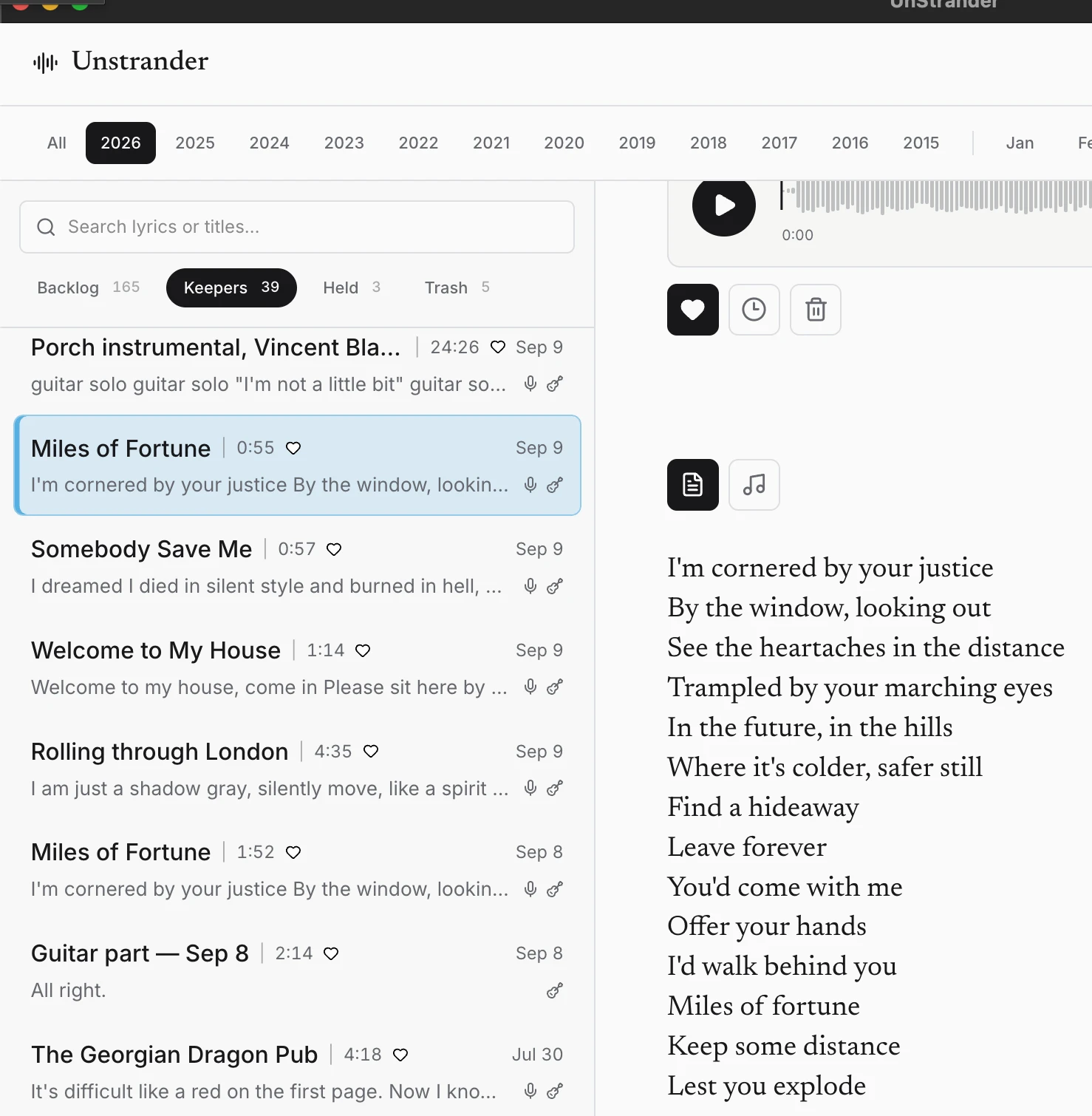
Unstrander is a Mac app I built for the songwriter's version of this problem: a long backlog of Voice Memos full of sung ideas. My own library is more than 900 memos recorded over about 11 years, most of them called "New Recording" something.
It reads the Voice Memos synced to your Mac, transcribes each one, and gives it a descriptive title from what it hears, so you can search by a line you remember. Spoken memos go through Apple's built-in speech recognition, and sung ones go through Whisper, an open-source model; both run on your Mac and nothing is uploaded. It doesn't change your Voice Memos, and it doesn't overwrite transcripts your iPhone already made. Every transcript is editable, because sung ones will need it.
It needs a Mac with Apple silicon on macOS 26 or later. There's a free trial with no time limit, and it's a one-time purchase after that; the details are on the pricing section.
If your memos aren't on your Mac yet, start with getting your Voice Memos safely onto your Mac. And if the bigger problem is the pile itself, read how to organize years of Voice Memos song ideas.
Your next great song might already be recorded.
You've captured the ideas. Unstrander helps you find them: years of Voice Memos turned into a searchable library, with descriptive titles, lyric transcripts, and a simple way to decide what to keep.
Download Unstrander free15 recordings titled and transcribed free. No credit card. No subscription. One-time $4.99 launch price ($29.99 regular) for unlimited processing.
For Apple silicon Macs with macOS 26 or later.